I had set up a desired Stoploss (SL) and Take Profit (TP) points/values — why did the system not properly trigger the Strategy SL & TP?
Your Strategy Stoploss (SL) and Take Profit (TP) are designed to trigger based on the live traded price (LTP) of the overall strategy (Strategy LTP), and not on theoretical values or guaranteed execution prices. In fast-moving markets, especially near market open – sudden spikes, gaps, or low liquidity can cause the strategy price to move sharply, resulting in exits happening differently than expected.
To understand this better, here’s how Strategy SL/TP works:
1. Strategy SL/TP works on the overall strategy price
For multi-leg option strategies such as spreads, straddles, iron condors, etc., the platform tracks the combined live value of all legs together.
Example:
You entered a naked Sell (Short) at Strategy Price = ₹100 ( i.e. a Net Sell/Credit strategy) example:
- Stoploss set at ₹20 loss
- Take Profit set at ₹30 profit
This means:
- SL triggers if Strategy LTP reaches ₹120
- TP triggers if Strategy LTP reaches ₹70
Once this trigger price is touched, the system initiates exit orders for all legs.
2. Trigger and execution are different things
Many users expect that if SL = ₹120, they will exit exactly at ₹120. However:
- ₹120 is only the trigger condition
- Actual exit depends on the best available Bid/Ask prices at that moment
If the market moves fast, execution may happen above or below the trigger level.
Example:
You set SL at ₹120.
If strategy price moves:
₹118 → ₹121 → ₹126
Then SL may trigger at ₹121, but actual exit could happen near ₹124–₹126 depending on available market prices and the configured MPP (Market Price Protection).
3. Why this happens more often at Market Open (9:15 AM)
At market open:
- Option premiums reprice sharply after overnight news
- Bid-Ask spreads are wider
- Liquidity can be uneven
- Prices move in jumps, not smooth ticks
So even if you set an exact SL/TP, the market may move through that level before all legs are exited.
Example:
You set TP at ₹50.
Strategy value moves:
₹58 → ₹53 → ₹46 instantly
The trigger may activate when level is crossed, but final execution may happen near ₹47–₹48.
4. Best Available Bid/Ask Price impacts exits
When a strategy exits, each option leg must be squared off separately.
Example:
- A Sell leg exits through a Buy order, so it executes near the available Ask price
- A Buy leg exits through a Sell order, so it executes near the available Bid price
If one leg has poor liquidity, the final overall strategy exit value can differ from the expected SL/TP level.
This is more common in:
- Far OTM strikes
- Weekly expiries near open/close
- Sudden volatile moves
5. Points value and Rupees value are linked
Points and rupees are not separate triggers – they are two ways of representing the same threshold.
Example:
For 1 lot of Nifty (lot size 65):
10 x 65 = 650
So:
- 10 points = ₹650
- ₹650 = 10 points
Changing one automatically updates the other.
6. Why booked profit may be lower than target
Even if your target was touched momentarily:
- Trigger happens first
- Exit orders still need execution
- Final fills depend on live market prices
Example:
Target Profit = ₹500
Market briefly touched the target, but due to reversal:
Actual booked profit = ₹320
This means the TP triggered, but execution happened during changing prices.
7. Why Stoploss can exceed expected loss
Similarly:
SL = ₹1,000
If the market gaps sharply against the strategy:
Actual booked loss = ₹1,280
Because once triggered, exits happen at available prices—not at a guaranteed fixed price.
8. How to reduce such mismatches
Practical Tips:
1. Avoid starting strategies immediately at 9:15 AM
Wait for markets to stabilize.
2. Trade liquid strikes
ATM / Near ATM strikes generally have better fills.
3. Keep realistic SL/TP levels
Very tight triggers may activate in normal noise.
4. Be cautious on expiry days
Premiums can move sharply.
5. Use wider buffers for multi-leg strategies
Multiple legs need simultaneous execution.
6. Configure MPP (Market Price Protection) appropriately
- Default MPP is generally 5%
- Can be adjusted from 0% to 20%
- Lower MPP may improve price discipline but increases the risk of pending/unfilled legs
Example:
If Buy Order Price = ₹100 with MPP = 5%
- Order can execute in between ₹100 to ₹105
- If price moves beyond ₹105, order may remain pending/unfilled
If Sell Order Price = ₹100 with MPP = 5%
- Order can execute between ₹95 and ₹100
- If price moves beyond ₹95, order may remain pending/unfilled
MPP helps avoid poor fills during sudden spikes.
9. Important Clarification
Strategy SL/TP is a risk-management trigger, not a guaranteed exact exit price. It helps automate exits when your threshold is reached, but the final booked P&L depends on:
- Bid-Ask spreads + the MPP configuration
- Speed of price movement
- Multi-leg execution timing
- Market liquidity
10. Live Example
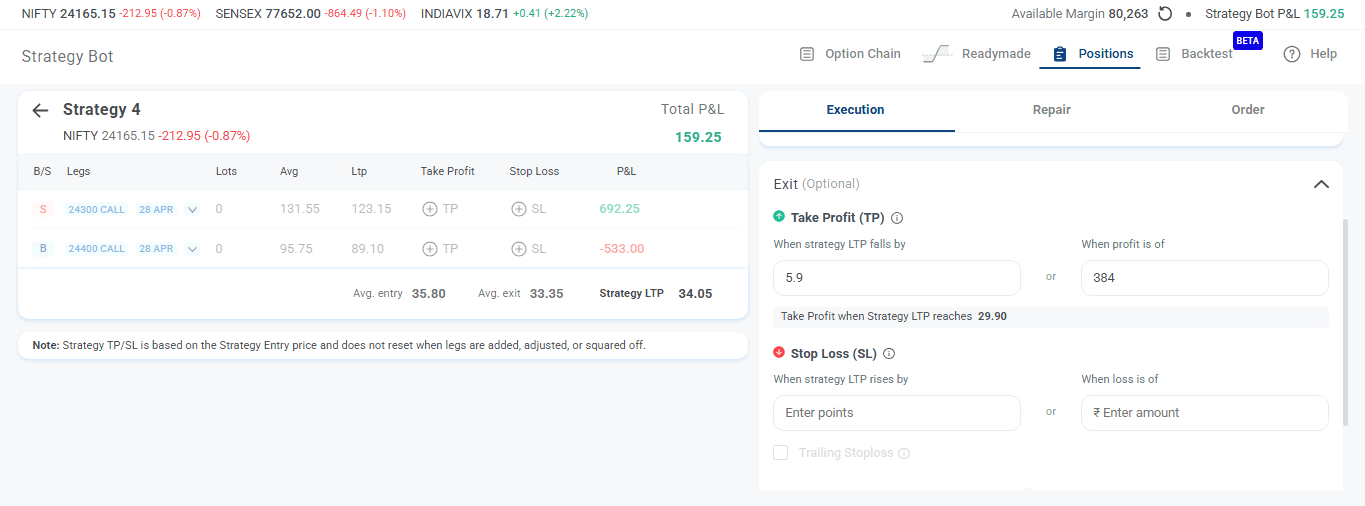
On 23-Apr-2026, a trader entered a 24300–24400 CE Bear Call Spread (net credit spread) at Strategy Entry = 35.80 and kept a Take Profit of 5.9 points (₹384).
This means TP would trigger when Strategy LTP reached 29.90.
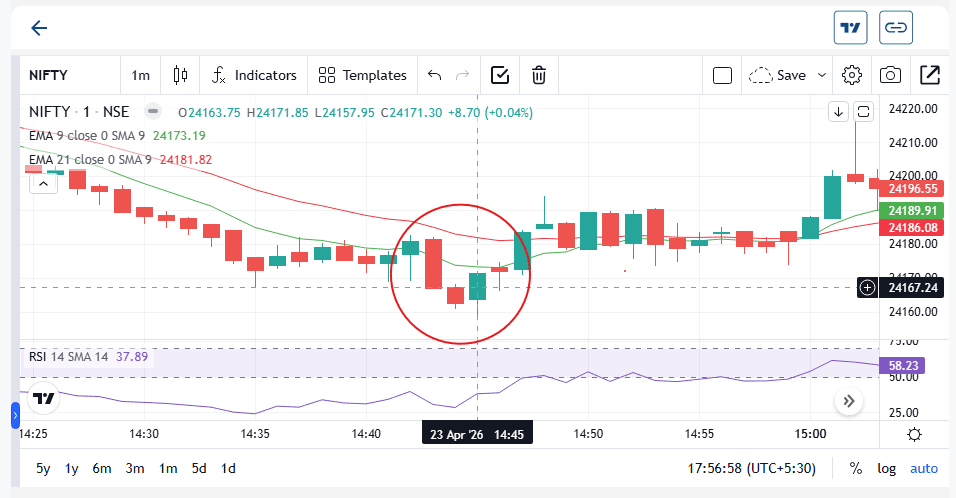
At around 2:44–2:45 PM, the TP level was triggered near 29.90. However, the final strategy exit happened around 33.35, leading to booked profit of approximately ₹159.25 instead of ₹384.
Why?
- NIFTY made a quick downside move that triggered TP
- Immediately after, the next candle reversed upward (in Green)
- During execution of all legs, prices changed rapidly
So, TP triggered correctly, but final realized profit differed due to market movement during execution.
11. Simple Summary
Think of SL/TP like a fire alarm:
- Alarm rings when smoke is detected (trigger hit)
- But the actual response depends on real-world conditions (market execution)
So, the system may correctly trigger your SL/TP, while the final booked P&L can still differ from the exact number you had set.