


Kotak
Stockshaala
Chapter 4 | 2 min read
Rolling Forecasts: How to Create and Update in Excel
Rolling forecasts are dynamic financial planning tools that continuously update projections based on actual performance, helping businesses adapt quickly to changing circumstances. Unlike static forecasts that remain fixed for a year, rolling forecasts adjust the forecast period as each month or quarter passes, providing a 12-month view that updates monthly or quarterly.
Why Use Rolling Forecasts?
-
Enhanced Flexibility: Adjust plans based on recent performance or market changes.
-
Continuous Planning: Keep a constantly updated view of the next 12, 18, or 24 months.
-
Improved Accuracy: Refine future predictions with real-time data.
Key Components of Rolling Forecasts
-
Historical Data: Use recent actuals as a basis for projecting future performance.
-
Assumptions: Include assumptions for sales growth, expense rates, and market conditions.
-
Update Frequency: Decide on a monthly, quarterly, or annual update cycle.
Step-by-Step Guide to Building Rolling Forecasts in Excel
Step 1: Set Up Historical Data and Baseline Assumptions
Include recent months’ actuals in your worksheet, such as:
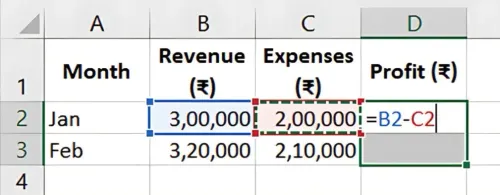
Jan | ₹3,00,000 | ₹2,00,000 | ₹1,00,000 |
Feb | ₹3,20,000 | ₹2,10,000 | ₹1,10,000 |
... | ... | ... | ... |
Step 2: Add Forecast Columns
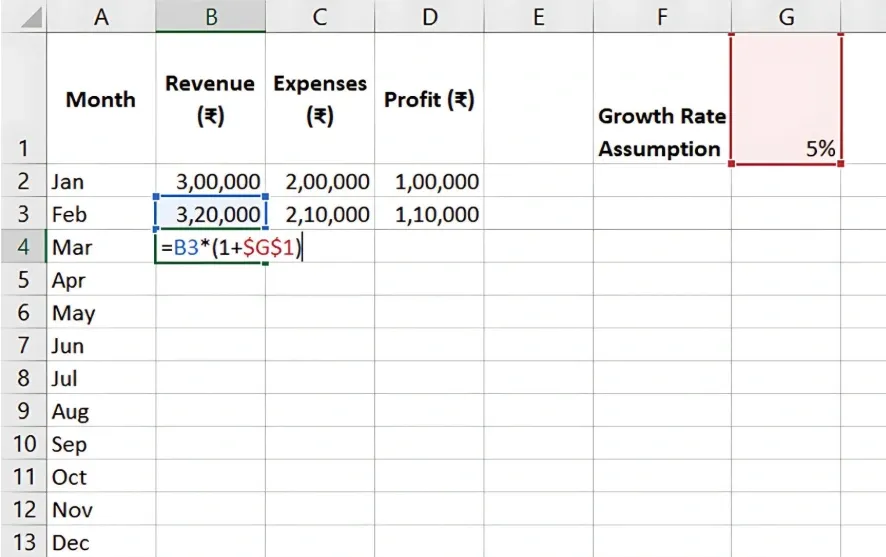
For a 12-month rolling forecast, create columns for future months based on baseline assumptions, like a 5% revenue growth.
In the first forecast month, use:
-
=Previous Month Revenue * (1 + Growth Rate)
-
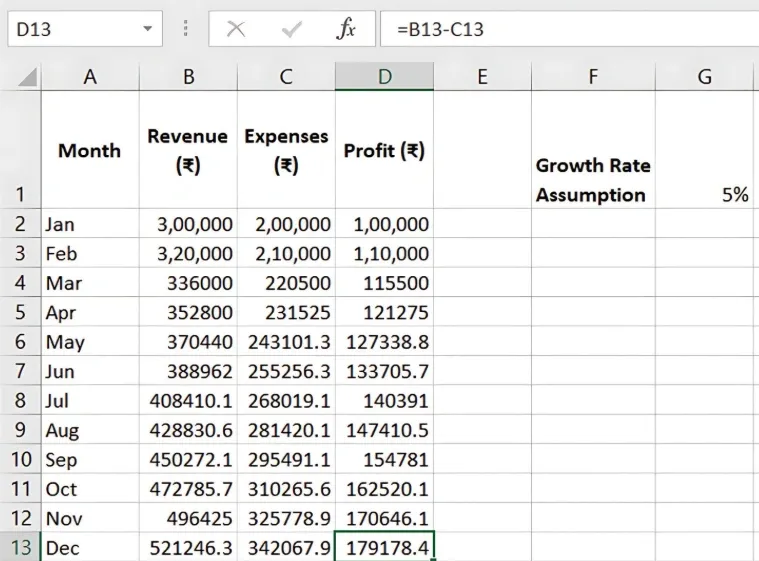
Drag the formula across forecast months to generate revenue projections.
Step 3: Update Actuals and Roll the Forecast
Each month, replace the oldest forecast month with actual results, adding another forecast month at the end of the series.
- Input actual results to update the historical data.
- Extend the forecast forward by applying assumptions to the newly added month.
Benefits of Rolling Forecasts in Excel
-
Adaptability: Update forecasts quickly to reflect recent performance.
-
Proactive Adjustments: React promptly to changes by seeing future cash flow implications.
-
Accurate Planning: Rolling forecasts ensure a continuous and updated financial outlook.
Key Takeaways:
-
Rolling forecasts provide a flexible, constantly updated view of future performance.
-
Excel’s formulas and data updating features make it easy to roll forward forecasts monthly.
-
Regularly updated forecasts support agile decision-making and financial planning.
Conclusion
Using rolling forecasts helps businesses maintain a current view of their financial future, allowing for quick adjustments. Excel simplifies these updates, making it ideal for dynamic planning.
Next Chapter Preview: In the next chapter, we’ll explore Cash Flow Projections Using Excel Templates. Understanding cash flow is critical for managing liquidity and financial health. This chapter will show you how to project cash flows accurately using Excel templates. Stay tuned!
Recommended Courses for you

















Learn, Invest, and Grow with Kotak Videos
Explore our comprehensive video library that blends expert market insights with Kotak's innovative financial solutions to support your goals.

Trading with collateral as margin with Kotak Neo

How India is Redefining Space Exploration

