


Kotak
Stockshaala
Chapter 5 | 2 min read
Cash Flow Projections Using Excel Templates
Cash flow projections are essential for evaluating a business’s liquidity, solvency, and financial health. By forecasting cash inflows and outflows, you can ensure that the company has enough cash to cover expenses and investments. Excel templates provide a convenient way to create, manage, and update cash flow projections, enabling you to make informed financial decisions.
Why Are Cash Flow Projections Important?
-
Liquidity Management: Forecasting ensures the business can meet short-term obligations.
-
Planning: Helps allocate resources effectively for operations, debt repayment, and growth.
-
Risk Management: Identifies potential cash shortages early, allowing for proactive adjustments.
Key Components of Cash Flow Projections
-
Cash Inflows: Include revenue from sales, interest income, and any other expected cash sources.
-
Cash Outflows: Include operational expenses, loan payments, and capital expenditures.
-
Net Cash Flow: Calculated as the difference between total inflows and outflows.
Step-by-Step Guide to Creating Cash Flow Projections in Excel
Step 1: Set Up Cash Flow Categories
Organise cash inflows and outflows in categories such as:
Jan | ₹3,00,000 | ₹2,00,000 | ₹1,00,000 | ₹50,000 | ₹1,50,000 |
Feb | ₹3,20,000 | ₹2,10,000 | ₹1,10,000 | ₹1,50,000 | ₹2,60,000 |
... | ... | ... | ... | ... | ... |
Step 2: Apply Formulas for Net Cash Flow and Balances
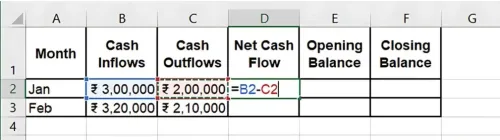
Net Cash Flow: Calculate as inflows minus outflows. =Cash Inflows - Cash Outflows
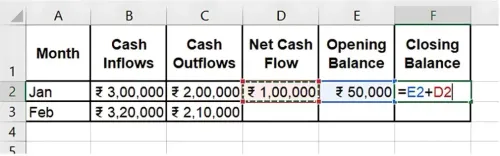
Closing Balance: Add the Opening Balance to the Net Cash Flow. =Opening Balance + Net Cash Flow
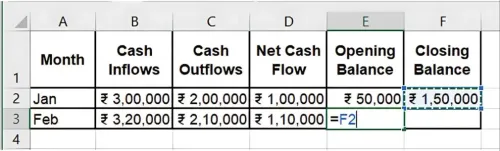
Rolling Balances: Use the previous month’s closing balance as the next month’s opening balance.
Step 3: Update Projections Monthly
Each month, replace projected numbers with actuals, updating the template for a rolling view of cash flow. This ensures you’re working with the most accurate data.
Benefits of Excel for Cash Flow Projections
-
Real-Time Updates: Update projections regularly for accurate planning.
-
Automated Calculations: Excel’s formulas simplify net cash flow and balance calculations.
-
Scenario Testing: Test different inflow and outflow scenarios to plan for various financial conditions.
Key Takeaways:
-
Cash flow projections help anticipate and manage liquidity effectively.
-
Excel templates automate cash flow calculations, saving time and reducing errors.
-
Regularly updating projections ensures accurate, real-time financial planning.
Conclusion
Building cash flow projections in Excel provides insights into cash needs and potential surpluses, helping businesses plan and adjust proactively. Excel’s structured templates make these projections efficient and easy to maintain.
Next Chapter Preview: In the next chapter, we’ll cover Personal Net Worth Calculation: Creating a Financial Snapshot in Excel. Personal net worth calculations help you assess your financial health and plan for the future. Stay tuned for step-by-step guidance on creating your financial snapshot!
Recommended Courses for you

















Learn, Invest, and Grow with Kotak Videos
Explore our comprehensive video library that blends expert market insights with Kotak's innovative financial solutions to support your goals.

Trading with collateral as margin with Kotak Neo

How India is Redefining Space Exploration

