


Kotak
Stockshaala
Chapter 1 | 2 min read
Personal Net Worth Calculation: Creating a Financial Snapshot
A Personal Net Worth Statement provides a snapshot of your financial health at a specific point in time. It is calculated by subtracting your liabilities (debts) from your assets (what you own). Understanding your net worth allows you to track your financial progress and make informed decisions for future financial planning.
In this chapter, we’ll explore step-by-step how to create a personal net worth statement in Excel to give you a clear overview of your financial standing.
What is Personal Net Worth?
Net Worth is a simple formula: Net Worth = Total Assets - Total Liabilities
Where:
-
Assets: Include cash, savings, investments, real estate, and personal property.
-
Liabilities: Include mortgages, loans, credit card debt, and other obligations.
Step-by-Step Guide: Calculating Personal Net Worth in Excel
Step 1: List Your Assets
Start by listing all your assets in an Excel worksheet, breaking them down into categories such as:
-
Cash and Cash Equivalents: Savings accounts, checking accounts, emergency funds.
-
Investments: Stocks, bonds, mutual funds, retirement accounts (401k, IRAs).
-
Real Estate: Home, rental properties, land.
-
Personal Property: Vehicles, jewellery, collectables.
Cash | ₹10,000 |
Retirement Account | ₹50,000 |
Home Value | ₹200,000 |
Car | ₹15,000 |
Step 2: List Your Liabilities
Next, list all your liabilities, such as:
-
Mortgages: Outstanding balance on home loans.
-
Loans: Car loans, student loans, personal loans.
-
Credit Card Debt: Total credit card balances.
-
Other Debts: Any other liabilities.
Mortgage | ₹150,000 |
Car Loan | ₹10,000 |
Credit Card Debt | ₹5,000 |
Step 3: Calculate Total Assets and Liabilities
In Excel, sum up the total value of your assets and liabilities using the SUM function:
=SUM(B2:B5)
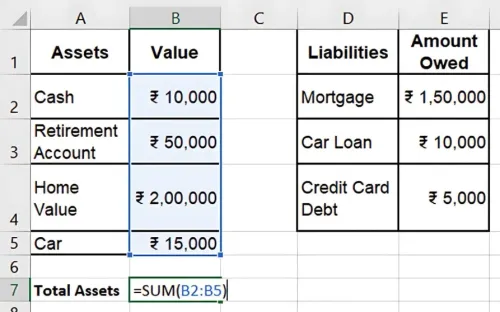
|Total Assets | ₹275,000 | | Total Liabilities | ₹165,000 |
Step 4: Calculate Your Net Worth
Subtract the total liabilities from the total assets to calculate your net worth: =Total Assets - Total Liabilities
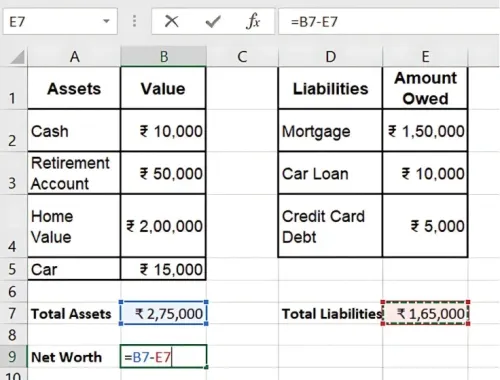
Result: Your net worth is ₹110,000.
Step 5: Update Regularly
Your personal net worth changes as your assets grow or debts are paid off. Regularly updating your net worth statement will help you track your financial progress.
Key Takeaways:
-
A Personal Net Worth Statement provides a clear snapshot of your financial health.
-
Track assets like savings, investments, and real estate, and list liabilities such as loans and credit card debt.
-
Use Excel to easily calculate and update your net worth as your financial situation changes.
Conclusion:
By creating a personal net worth statement in Excel, you gain insight into your financial standing and a clear view of your assets and liabilities. This tool helps guide financial decisions and track long-term progress toward financial goals.
Next Chapter Preview: In the next chapter, we will cover Retirement Corpus Calculation Using Excel, where we’ll explore how to calculate the amount you need to save for retirement based on your financial goals. Stay tuned for detailed calculations to plan for a secure retirement!
Recommended Courses for you

















Learn, Invest, and Grow with Kotak Videos
Explore our comprehensive video library that blends expert market insights with Kotak's innovative financial solutions to support your goals.

Trading with collateral as margin with Kotak Neo

How India is Redefining Space Exploration

