


Kotak
Stockshaala
Chapter 7 | 3 min read
Calculating Internal Rate of Return (IRR) for Investment Projects
The Internal Rate of Return (IRR) is a vital metric in finance that is used to evaluate the profitability of investment projects. It represents the discount rate that makes the Net Present Value (NPV) of future cash flows equal to zero. IRR helps investors and businesses assess whether a project is worth pursuing based on its potential returns, making it a key tool in capital budgeting.
In this blog, we’ll delve into the concept of IRR, its significance, and how to calculate it using Excel for real-world applications.
What is the Internal Rate of Return (IRR)?
Internal Rate of Return (IRR) is the discount rate at which the present value of a series of cash flows (both inflows and outflows) equals zero. Essentially, it is the break-even interest rate that an investment needs to achieve to be worthwhile.
The formula for IRR:
IRR does not have a straightforward formula like NPV. It is typically calculated using trial and error or with the help of financial software or Excel’s built-in IRR function. The general formula is:
0 = ∑(t=0)n [Ct / (1 + IRR)t]
Where: - Ct = Cash flow at time t - n = Number of periods (years) - IRR = Internal Rate of Return
Why is IRR Important?
-
Comparing Investment Projects: IRR is often used to rank investment opportunities. A project with a higher IRR is usually preferred if all other factors are equal.
-
Decision-Making: If the IRR exceeds the required rate of return or the company's hurdle rate, the project is typically considered a good investment.
-
Understanding Break-Even Points: IRR provides insight into the interest rate at which an investment neither gains nor loses money.
Example of IRR Calculation
Suppose you invest ₹10,000 in a project expected to generate the following cash flows over 5 years:
0 | -₹10,000 |
1 | ₹2,500 |
2 | ₹3,000 |
3 | ₹3,500 |
4 | ₹4,000 |
5 | ₹4,500 |
Calculating IRR in Excel
Excel’s IRR function makes it easy to find the rate at which the present value of future cash flows equals the initial investment.
Step-by-Step Guide to Calculate IRR in Excel:
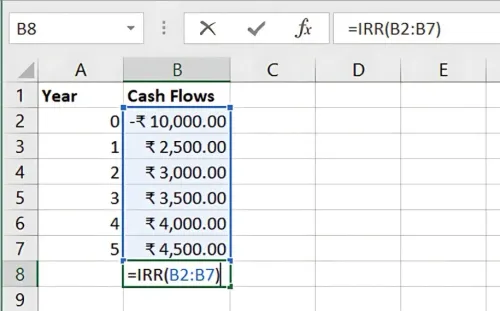
- Set Up Cash Flow Data:
- Column A: Year (0 to 5)
- Column B: Cash Flows (-10000, 2500, 3000, 3500, 4000, 4500)
- Use the IRR Formula:
- Select an empty cell and enter the following formula:
=IRR(B2:B7)
-
Here, B2:B7 represents the range of cash flows.
-
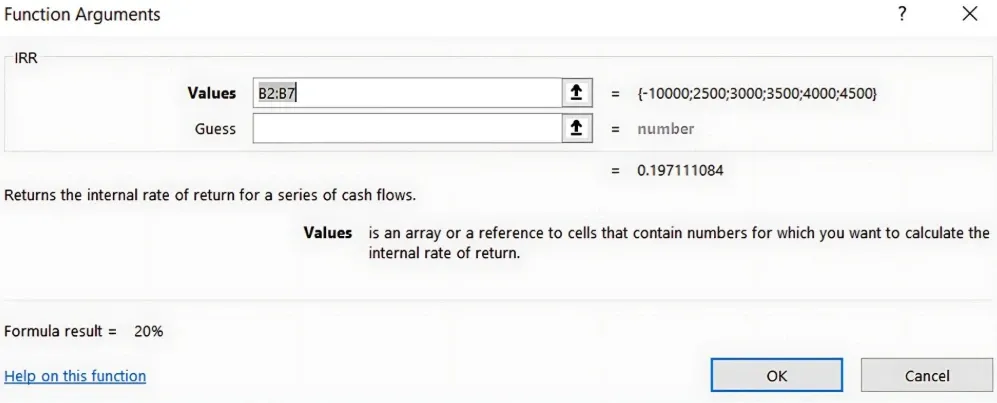
Result: IRR value as a percentage Excel will return the IRR that makes the NPV of the cash flows equal to zero. In this example, the IRR might be around 20%, depending on the exact cash flows.
Benefits of Using IRR
-
Easy Interpretation: IRR is expressed as a percentage, making it simple to compare with required rates of return or other investment opportunities.
-
Comprehensive Analysis: It considers the time value of money and all future cash flows, offering a complete view of a project’s potential.
-
Objective Decision-Making: A clear-cut rule (accept if IRR > required rate, reject if IRR < required rate) aids in investment decisions.
Key Takeaways:
- Internal Rate of Return (IRR) is the discount rate that makes the NPV of future cash flows zero.
- A higher IRR indicates a more profitable investment.
- The IRR function in Excel simplifies the calculation, making it accessible for both professionals and beginners.
Conclusion:
Understanding how to calculate IRR can significantly improve your ability to assess investment projects. It provides a clear view of the expected return, allowing you to make better financial decisions.
Next Chapter Preview: In the next chapter, we will explore Discounted Cash Flow (DCF) Analysis: Excel Setup, focusing on how to set up and interpret a DCF model to value investment opportunities. Stay tuned to learn the step-by-step process of evaluating future cash flows and determining the intrinsic value of investments!
Recommended Courses for you

















Learn, Invest, and Grow with Kotak Videos
Explore our comprehensive video library that blends expert market insights with Kotak's innovative financial solutions to support your goals.

Trading with collateral as margin with Kotak Neo

How India is Redefining Space Exploration

