


Kotak
Stockshaala
Chapter 5 | 2 min read
Bond Valuation: Premium, Par, and Discount Bond Calculations
Bond valuation is essential for understanding whether a bond is trading at par, premium, or discount based on its coupon rate and the current market interest rate. When interest rates change, bond prices adjust to maintain alignment with the prevailing yield expectations. This chapter guides you through bond valuation calculations in Excel, helping you analyse bonds accurately and make informed investment choices.
Why Bond Valuation Matters
-
Investment Decisions: Determine whether a bond offers a good return relative to other investments.
-
Price Sensitivity: Understand how market interest rates affect bond prices.
-
Income Planning: Identify bonds trading at a discount or premium to assess cash flow potential.
Types of Bond Valuation
-
Par Value: A bond trades at par when its price equals the face value, usually when the coupon rate matches the market interest rate.
-
Premium Bond: Trades above face value when the coupon rate is higher than the market rate, offering above-market interest.
-
Discount Bond: Trades below face value when the coupon rate is lower than the market rate.
Bond Valuation Formula
The price of a bond is the present value of its future cash flows, including periodic coupon payments and the face value at maturity.
Bond Price = ∑ [Coupon Payment / (1 + YTM)^t] + [Face Value / (1 + YTM)^n]
Where:
-
Coupon Payment: Interest payment, calculated as Face Value × Coupon Rate.
-
YTM: Yield to Maturity, or the required rate of return.
-
t: Periods to maturity.
Step-by-Step Guide to Calculating Bond Price in Excel
Step 1: Set Bond Details
Assume a bond with:
- Face Value = ₹1,000
- Coupon Rate =5%
- Yield to Maturity (YTM) = 4%
- Maturity = 5 years
Face Value | ₹1,000 |
Coupon Rate | 5% |
YTM | 4% |
Maturity | 5 years |
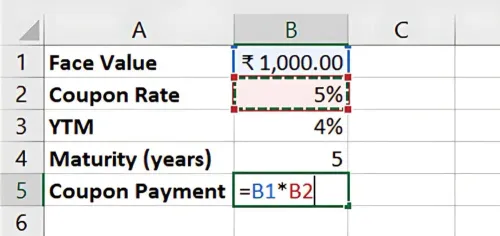
Step 2: Calculate Coupon Payment
The coupon payment is:
=Face Value * Coupon Rate
For this example:
=1000 * 5% = ₹50
Step 3: Calculate the Bond Price in Excel
Using Excel’s PV function, calculate the bond price by discounting each cash flow (coupon payments and face value) back to the present.
=PV(YTM, Maturity, -Coupon Payment, -Fae Value)
For this example:
=-PV(4%, 5, -50, -1000)
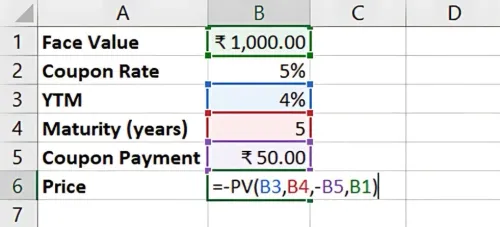
Result: This calculation provides the bond price, helping you determine if it’s trading at a premium, par, or discount.
Key Takeaways:
-
A bond trades at par when its coupon rate matches the market rate.
-
A premium bond has a coupon rate above the market rate, while a discount bond has a lower coupon rate.
-
Excel’s PV function simplifies bond valuation, enabling quick and accurate analysis.
Conclusion
Bond valuation is vital for evaluating potential returns and understanding market pricing. Excel streamlines these calculations, supporting informed investment decisions.
Next Chapter Preview: In the next chapter, we’ll explore Creating a Dynamic Budgeting Template in Excel. This allows you to track income and expenses in real-time, adjust projections, and gain valuable insights for financial planning. Stay tuned!
Recommended Courses for you

















Learn, Invest, and Grow with Kotak Videos
Explore our comprehensive video library that blends expert market insights with Kotak's innovative financial solutions to support your goals.

Trading with collateral as margin with Kotak Neo

How India is Redefining Space Exploration

