
What are Overall Strategy Settings and how do they work?
- All features available under Overall Strategy Settings are applied to your entire strategy, not on individual legs.
- These settings help you control risk and lock profits at a strategy level.
a. Strategy Stop Loss: This feature enables you to set overall stop loss on strategy. You have 2 option in overall stop loss:
(i) Max Loss:- This option enables you to set the Strategy Stop-Loss in absolute P&L terms.
Example:
- Underlying: Nifty
- Entry Time: 09:30
- Exit Time: 15:20
- Strike: ATM
- Legs: CE and PE
- Position: Sell
- Strategy SL (Max Loss): ₹2,000
- If at any point during the day (between entry and exit time) the total loss of the strategy reaches ₹2,000, the system will immediately exit the entire strategy.
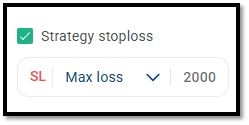
(ii) Premium % :- This option enables you to set the Strategy Stop-Loss as a percentage of the total combined premium of all legs.
Example:
- Underlying: Nifty
- Entry Time: 09:30
- Exit Time: 15:20
- Strike: ATM
- Legs: CE and PE
- Position: Sell
- Strategy SL (Premium %): 20% At 09:20,
- ATM CE price: 60
- ATM PE price: 40
- Combined Premium: 60+40 = 100
- Overall SL: 20% of 100 = 20 points
- If at any point during the day the total loss reaches 20 points, the strategy will be exited.
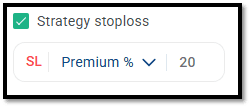
b. Strategy Re-Entry on Strategy SL: This feature enables you to re-enter in a position after an overall Stop Loss is hit.
- This feature enables you to automatically re-enter the strategy after the overall Stop Loss is hit.
- You can use this feature only if Overall Strategy Stop-Loss is enabled.
- The system supports a maximum of 5 re-entries.
- After the SL is triggered and the entire strategy exits, it will re-enter again based on the same entry conditions.
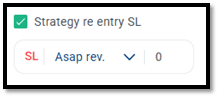
- You can choose from 4 re-entry modes using the dropdown (as shown in the image).
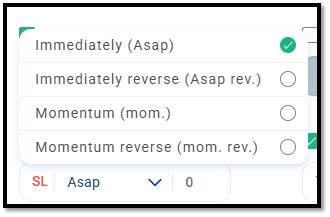
(i) Immediately (ASAP):
- This option enables you to re-enter immediately into a new strike at market price, based on the same strike selection logic used during the initial entry.
- When your overall SL is hit, the strategy exits completely.
- The system immediately checks for the current ATM strike (or whichever strike logic you selected initially).
- It will take a fresh entry in the same leg positions (CE/PE, Buy/Sell) using the new ATM strike available at that moment.
- You can do up to 5 re-entries.
Example
- Underlying: Nifty
- Entry: 09:30
- Exit: 03:20
- Strike Selection: ATM
- Legs: CE and PE
- Position: Buy
- Strategy SL (P&L): 2,000
- Re-Entry ASAP on Strategy SL: 1
• At 09:30,
-
Spot: 25010
-
ATM strike: 25000 CE and 25000 PE
-
At 09:50,
- Total loss reaches: 2,000
- Strategy is squared off
- Since Strategy Re-Entry is set as Immediately,
- Nifty spot at 9:50: 25190
- New ATM strikes: 25200
- Strategy will re-enter in 25200 CE and PE
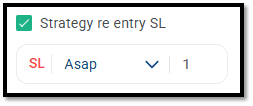
(ii) Immediately Reverse (ASAP Rev):
- This option enables you to re-enter immediately in the opposite position after your overall Stop Loss is hit.
- When the overall SL is hit, the strategy exits.
- The system immediately selects a new strike using the same strike logic (ATM/OTM/ITM) defined in your initial setup.
- It then re-enters with the exact opposite position of your original strategy:
- If your original position was Buy, the re-entry will be Sell.
- If your original position was Sell, the re-entry will be Buy.
- You can do up to 5 re-entries.
Example:
- Underlying: Nifty
- Entry: 09:30
- Exit: 03:20
- Strike Selection: ATM
- Legs: CE and PE
- Position: Buy
- Strategy SL (P&L): 2,000
- Re-Entry ASAP on Strategy SL: 1
- At 09:30,
- Spot: 25010
- ATM strike: 25000 CE and 25000 PE
- Position: Buy
- At 09:50,
- Total loss reaches: 2,000
- Strategy is squared off
- Since Strategy Re-Entry is Immediately Reverse,
- Nifty spot at 9:50: 25190
- New ATM strikes: 25200
- Strategy will re-enter in 25200 CE and PE Sell position
(iii) Momentum:
- This option enables you to re-enter in a new strike at market price, but only when the momentum condition is met, as defined in your entry legs.
- After your overall SL hits, the strategy exits.
- It then identifies a new strike using your selected strike logic (ATM/ITM/OTM).
- Once the new strike is identified, it waits for your momentum condition (points or percentage) to be satisfied in any of the legs, and if the momentum condition is met, then the orders are fired at market.
Example
-
Underlying: Nifty
-
Entry: 09:20
-
Exit: 03:20
-
Strike Selection: ATM
-
Legs: CE and PE
-
Position: Buy
-
Momentum Condition on both legs: 10%
-
Overall SL (MTM): 2000
-
Re-Entry (Momentum): 1
-
The CE and PE legs take initial entry at (after their 10% momentum conditions were met:
- Call: 09:26 AM
- Put: 09:28 AM
-
At 09:55,
- Strategy SL of ₹2000 hits → Strategy exits.
- Now, based on the Re-Entry Momentum setting:
- At 09:55, Nifty spot = 18446 → ATM = 18450
- Prices:
-
18450 CE = 200
-
18450 PE = 150
CE | 200 | 10% | 200 + 20 = 220 |
PE | 150 | 10% | 150 + 15 = 165 |
- Re-entry happens only when the respective trigger level is reached.
- So:
- Re-entry in 18450 CE Buy occurs at 220
- Re-entry in 18450 PE Buy occurs at 165
(iv) Momentum Reverse: