How to do leg setting?
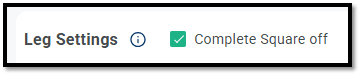
i. Complete square off: The Complete Square Off option closes all legs in the strategy when any one leg hits its Stop Loss (SL) or Target Profit (TP). If this option is enabled, the system will square off every leg together, instead of exiting only the individual leg that triggered SL/TP.
Example
- Entry: 9:20 AM
- Leg 1: ATM Call Sell
- Leg 2: ATM Put Sell
- TP/SL (both legs): 25 points
- Complete Square Off enabled: Yes
Scenario: At 10:00 AM, the SL of Leg 1 gets triggered.
Since Complete Square Off is enabled, both legs will be squared off immediately, and the entire strategy will be closed at that time.
ii. Simple momentum: The Simple Momentum feature allows you to take an entry only when the index or the option price moves by a specified amount after your entry condition is met. This movement can be defined in points or percentage. There are multiple momentum variations available. Each lets you control exactly when the system should take the entry based on price movement.

There are many features available under Simple momentum, you can use it to try different variations of momentum as shown in the image below.
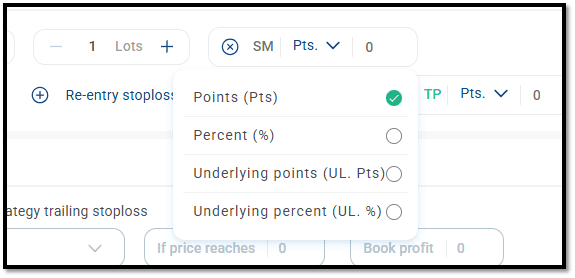
a. Points Above: This option takes an entry only if the option price moves up by X points after your entry condition is met.
Example
- Index: Nifty
- Entry Time: 09:20
- Strike: ATM CE
- Position: Buy
- Momentum Points Above: 15
At 9:20, the ATM CE LTP is 200. • Momentum condition = 200 + 15 = 215 • Entry will be taken only if the LTP moves up to 215. • If LTP never reaches 215, no entry will be taken.
b. Points Below: This option takes an entry only if the option price moves down by X points after your entry condition is met.
Example
- Index: Nifty
- Entry Time: 09:20
- Strike: ATM CE
- Position: Sell
- Momentum Points Below: 15
At 09:20, the ATM CE LTP is 200. • Momentum condition = 200 – 15 = 185 • Entry will be taken only if the LTP moves down to 185. • If the price never reaches 185, no entry will be taken.
c. Percent Above: This option takes an entry only if the option price moves up by X% after your entry condition is met.
Example
- Index: Nifty
- Entry Time: 09:20
- Strike: ATM CE
- Position: Buy
- Momentum % Above: 15%
At 9:20, the ATM CE LTP is 200. • Momentum Condition = 15% of 200 = 30 points • Entry price = 200 + 30 = 230 • Entry will be taken only when the price moves up to 230. • If the price never reaches 230, no entry will be taken.
d. Percent Below: This option takes an entry only if the option price moves down by X% after your entry condition is met.
Example
- Index: Nifty
- Entry Time: 09:20
- Strike: ATM CE
- Position: Sell
- Momentum % Below: 15%
At 9:20, the ATM CE LTP is 200. • Momentum Condition = 15% of 200 = 30 points • Entry price = 200 – 30 = 170 • Entry will be taken only when the price falls to 170. • If the price never reaches 170, no entry will be taken.
e. Underlying Points Above: This option takes an entry only if the index (spot price) moves up by X points after the entry condition is met.
Example
- Index: Nifty
- Entry Time: 09:20
- Strike: ATM CE
- Position: Buy
- Momentum Underlying Points Above: 15
At 9:20, Nifty Spot = 22520 • Momentum Condition = Required index level = 22520 + 15 = 22535 • Entry will be taken only if Nifty moves to 22535. • The strike is selected based on the index at 09:20, but the entry occurs only when the momentum level is reached. • If Nifty never reaches 22535, no entry will be taken.
f. Underlying Points Below: This option takes an entry only if the index moves down by X points after your entry condition is met.
Example
- Index: Nifty
- Entry Time: 09:20
- Strike: ATM CE
- Position: Sell
- Momentum Underlying Points Below: 15
At 9:20, Nifty Spot = 22520 • Momentum Condition = Required index level = 18520 - 15 = 22505 • Entry will be taken only if Nifty moves to 22505. • The strike is selected based on the index at 09:20, but the entry occurs only when the momentum level is reached. • If Nifty never reaches 22505, no entry will be taken.
g. Underlying Percent Above: This option takes an entry only if the index (spot price) moves up by X% after your entry condition is met.
Example
- Index: Nifty
- Entry Time: 09:20
- Strike: ATM CE
- Position: Buy
- Momentum Underlying % Above: 0.5%
At 9:20, Nifty Spot = 24000
- 0.5% of 24000= 120 points
- Required level = 24000 + 120 = 24120
- Entry will be taken only when Nifty moves to 24120
- If Nifty never reaches 24120, no entry will be taken.
h. Underlying Percent Below: This option takes an entry only if the index moves down by X% after your entry condition is met.
Example
- Index: Nifty
- Entry Time: 09:20
- Strike: ATM CE
- Position: Sell
- Momentum Underlying % Below: 0.5%
At 9:20, Nifty Spot = 24000
- 0.5% of 18000 = 120 points
- Required level = 24000 - 120 = 23880
- Entry will be taken only when Nifty falls to 23880
- If Nifty never reaches 23880, no entry will be taken

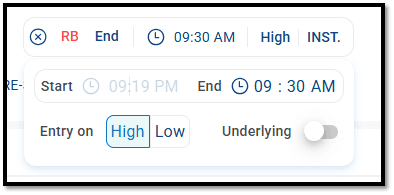
Step 2: Set the Start Time
- The system will begin tracking the high/low from your strategy’s entry time.
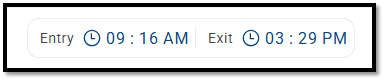
- You don’t need to enter anything manually — the Start Time is automatically fetched based on the Entry Time you’ve set in your strategy.
Example:
- If you’ve set your strategy’s entry time to 09:16, the system will automatically begin tracking the high/low from 09:16.
Step 3: Select the End Time
- Choose the end time of your tracking window.
Example:
- For a range between 09:16 and 09:30, select 09:30 as the End Time.
- The system will consider all price movements from 09:16:00 to 09:29:59.
Step 4: Choose High or Low
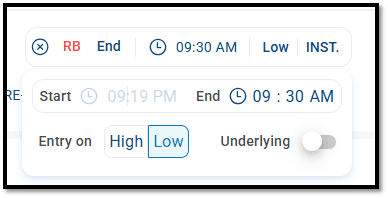
- Select whether the entry should be triggered when the High of the selected range is broken or when the Low of the range is broken.
Example:
- If you select High, the entry will be taken at the moment price crosses the high formed between 09:16–09:29:59.
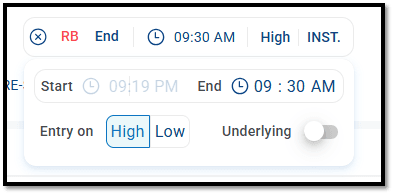
Step 5: Choose Underlying or Option Price Decide where the breakout should be tracked:
- Underlying (Index)
- Instrument (selected option strike)
- If Underlying is enabled: → The high/low range will be tracked on the index price. • If Underlying is disabled: → The high/low range will be tracked on the Instrument (selected option strike) selected at your entry time.
iv. Direction: This setting allows you to choose wether the position in your leg should be buy or sell
- We’ve added a simple switcher for this:
- Buy is selected by default when you add a leg.
- If you want to choose Sell instead, just tap on the Buy button—it will flip to Sell and visa-vera.
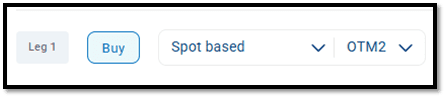
(i) Spot based:
- If your strategy is ATM based on Spot, you will see the Spot Based option.
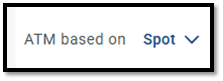
- This allows you to select strikes relative to the spot price.
- You can choose from:
- ATM
- OTM (1–20 strikes away)
- ITM (1–20 strikes away)
Examples:
Example 1 – Selecting OTM Strike
- Entry time: 09:30
- Strike Selection Criteria: 2-strike OTM CE
- If the underlying spot price at 09:30 is 24000, then the system will select 24100 CE.
Example 2 – Selecting ITM Strike
- Entry time: 09:30
- Strike Selection Criteria: 2-strike ITM CE
- If the underlying spot price at 09:30 is 24000, then the system will select 23900 CE.

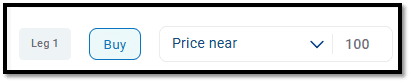
(iii) Price near:
- This feature allows you to select an option strike based on the nearest price.
- You simply enter the price you want (e.g., 50 or 100), and the system will automatically choose the strike whose price is closest to that value at your entry time.
Example:
- Entry time: 09:30
- Strike Selection Criteria: Price Near
- LTP Value: 100
- At 09:30, the system will pick the strike whose price is nearest to 100 and take entry accordingly.
(iv) Price above: • This feature lets you select an option strike whose price is greater than a value you specify. • Enter a target price (for example, 100). At your entry time the system will pick the first available strike whose price is greater than 100 and take the trade in that strike.
Example:
- Entry time: 09:30
- Strike Selection Criteria: Price above
- LTP Value: 100
- At 09:30, the system will pick the strike whose price is higher than 100 and enter that strike.

(v) Price below:
- This feature lets you select an option strike whose price is lower than a value you specify.
- Enter a target price (for example, 100). At your entry time the system will pick the first available strike whose price is lower than 100 and take the trade in that strike.
Example:
- Entry time: 09:30
- Strike Selection Criteria: Price below
- LTP Value: 100
- At 09:30, the system will pick the strike whose price is lower than 100 and enter that strike.

(vi) Price range:
- This feature allows you to select an option strike based on a price range defined by you.
- You simply enter a Lower and Upper price value, and at your entry time the system will select a strike whose price falls within that range.
Example:
- Entry time: 09:30
- Select Strike Criteria: Premium Range
- Lower value: 100
- Upper value: 200
- At 09:30, the system will select a strike whose premium is between ₹100 and ₹200 and take entry in that strike. • If no strike is available in this range at the entry time, no entry will be taken.

vi. Option Type: This setting allows you to choose the type of option you want to trade in your strategy.
- We’ve added a simple switcher for this:
- Call is selected by default when you add a leg.
- If you want to choose Put instead, just tap on the Call button—it will flip to Put and visa-vera.
- Call is selected by default when you add a leg.
vii. Expiry:
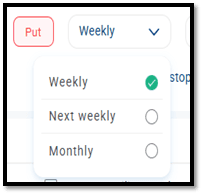
- The Expiry setting allows you to choose which options or futures expiry the system should use while running your backtest.
- You can pick from multiple expiry types depending on your strategy requirements:
- Weekly Expiry
- Monthly Expiry
viii. Stop Loss (SL): This feature lets you set stop-loss on individual legs using multiple methods. You can enable and disable it using the toggle shown in the image below.
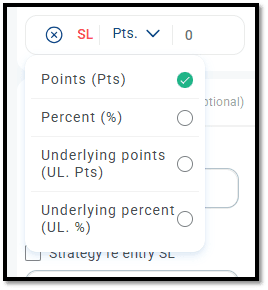
(i) Points (Pts): This option lets you set the Stop-Loss on individual CE/PE legs in absolute points on the option premium.
Example:
- Entry: 09:20
- Strike: ATM CE
- Position: Buy
- Stop-Loss parameter: 30 points
- ATM price at 09:20: 200
- SL at: 200 − 30 = 170
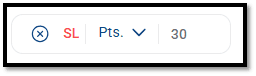
(ii) Percent (%): This option lets you set the Stop-Loss as a percentage of the option premium.
Example:
- Entry: 09:20
- Strike: ATM CE
- Position: Buy
- Stop-Loss parameter: 30%
- ATM price at 09:20: 200
- SL in points: 30% of 200 = 60
- SL at: 140

(iii) Underlying Points (UL. Pts): This option lets you set the Stop-Loss based on the index value.
Example:
- Entry: 09:20
- Strike: ATM CE
- Position: Buy
- Stop-Loss parameter: 100 points on underlying
- ATM price at 09:20: 200
- Underlying price (Nifty) at 09:20: 25000
- SL at: 25000 – 100 = 24900
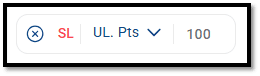
(iv) Underlying Percent (UL. %): This option lets you set the Stop-Loss as a percentage of the index value.
Example:
- Entry: 09:20
- Strike: ATM CE
- Position: Buy
- Stop-Loss parameter: 1% on underlying
- ATM price at 09:20: 200
- Underlying price (Nifty) at 09:20: 25000
- SL at: o 1% of 25000 = 250 o 25000 – 250 = 24750

ix. Trailing Stop Loss (TSL): This feature allows you to automatically shift your Stop-Loss as the instrument moves in your favor. In simple terms:
- When the price moves X points in your favor, your Stop-Loss will move Y points in the same direction.
(i) Points (Pts): If you select the Points option in Trailing SL and set 10 in the “If leg moves by” field and 5 in the “Then move stop-loss by” field, your Stop-Loss will trail by 5 points every time the instrument moves 10 points in your favor.
Example:
- Entry: 09:30
- Strike: ATM CE
- Position: Buy
- ATM CE LTP: 200
- Initial Stop-Loss: 50 points (i.e., from 200 → 150)
- Trail SL parameter:
- If leg moves by: 20 points
- Then move stop-loss by: 10 points (Move SL by 10 points for every 20-point favorable move)
- Now see how the Trailing SL adjusts:
200 (Entry) | — | 150 (Initial SL) |
220 | +20 points | SL moves by 10 points → 160 |
240 | +40 points | SL moves by another 10 points → 170 |
- And this continues until the trailing Stop-Loss is hit.
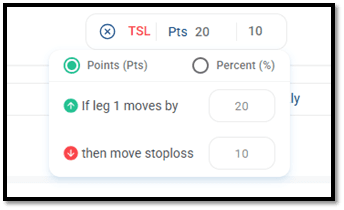
(ii) Percentage (%):
- This option enables you to trail your Stop-Loss based on percentage movement.
- Your actual Stop-Loss will move by Y% if the instrument moves X% in your favor.
- The percentage is always calculated on the entry price, and it remains fixed (it does not change as the price moves).
Example:
- Entry: 09:30
- Strike: ATM CE
- Position: Buy
- ATM CE LTP: 200
- Initial Stop-Loss: 50 points (i.e., from 200 → 150)
- Trail SL parameter:
- If leg moves by: 20 %
- Then move stop-loss by: 10 % (Move SL by 10% for every 20% favorable move)
- Your actual Stop-Loss = 150 (200 – 50)
- 20% of 200 = 40 points (price move required to trail)
- 10% of 200 = 20 points (amount by which SL will trail)
- Now see how the Trailing SL adjusts:
200 (Entry) | — | 150 (Initial SL after 50-point SL) |
240 | +40 points (20% move from entry price) | SL moves by 10 points → 160 |
240 | +40 points (20% move from entry price) | SL moves by another 20 points → 215 |
x. Re-Entry Stop Loss / Take Profit (RE–SL / RE-TP):
- This feature enables you to automatically re-enter a new position after your Stop-Loss or Take-Profit is hit.
- You can apply for a re-entry on SL, TP, or both.
- The maximum number of re-entries allowed is 20 per leg for SL and TP individually.
- You can enable the “Re-entry on SL” or “Re-entry on TP” options as shown in the images below.
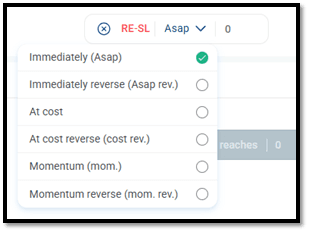
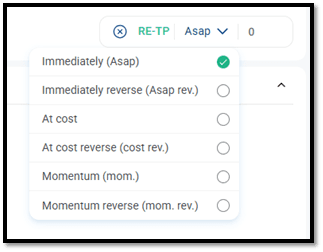
(i) Immediately (ASAP):
- This option enables you to re-enter immediately after your Stop-Loss or Take-Profit is hit, in whichever strike is available at that moment.
- For example, if your strategy uses an ATM strike, then after SL/TP is triggered, the system will look for the current ATM strike at that time and re-enter using that strike.
- You can select up to 20 re-entries for both SL and TP per leg.
Example:
-
Underlying: Nifty
-
Entry Time: 09:30
-
Strike: ATM CE
-
Position: Buy
-
SL: 50 Points
-
SL Re-Entry parameter: Immediately (ASAP)
-
No. Of re-entries: 1
-
At 09:30:
- Spot: 25010
- ATM strike: 25000
- LTP of ATM Strike: 200
- SL: 200 – 50 = 150
-
At 09:45 (SL Hit):
- LTP of ATM Strike: 150 (SL Hit)
- Spot: 25160
- New ATM strike: 25150
- According to the Immediately (ASAP) logic, the system will immediately re-enter using the current ATM CE, which is 25150 CE, available at 09:45.