
How to find IPO Mandate on Gpay?
Investing in IPOs through Kotak Neo has never been easier with UPI-based payments. Once you submit your IPO application, you’ll receive a UPI mandate request on your payment app—such as Gpay or PhonePe—asking you to authorize the amount to be blocked in your account. However, it’s important to know how to locate and approve the mandate request to ensure your IPO application is processed smoothly.
In this article, we’ll guide you through the steps to approve the IPO mandate using Gpay, address any delays you might encounter, and provide a solution if the mandate request doesn’t arrive on time.
Steps to Approve Your IPO Mandate on Gpay
1. Open the Gpay App
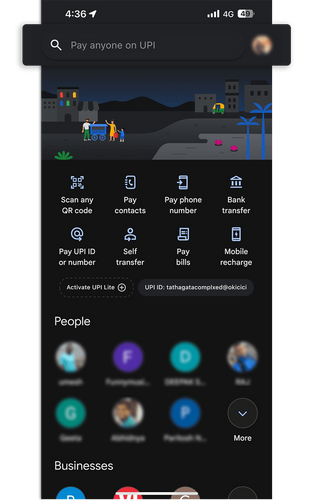
Launch Gpay on your mobile device and tap on your profile picture in the top-right corner of the screen.
2. Access Autopay
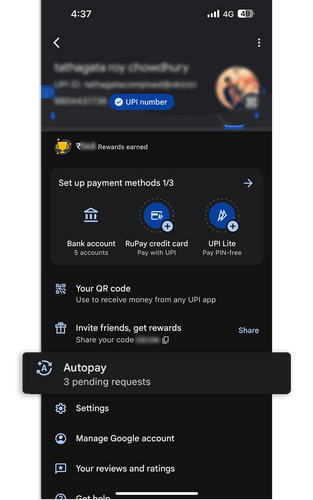
From the options, select Autopay and locate the pending IPO mandate request under the Autopay section.
3. View Mandate Details
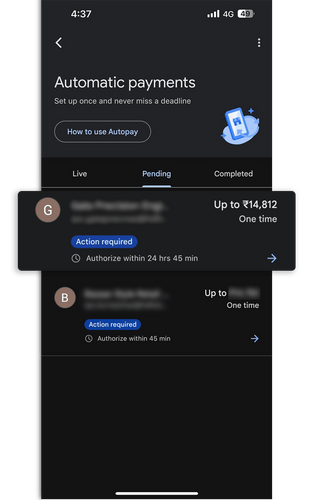
On the mandate request screen, under the Pending section, you will see the autopay request from the IPO company name you have applied for, along with the UPI ID, and the amount to be debited.
4. Authorize the Payment
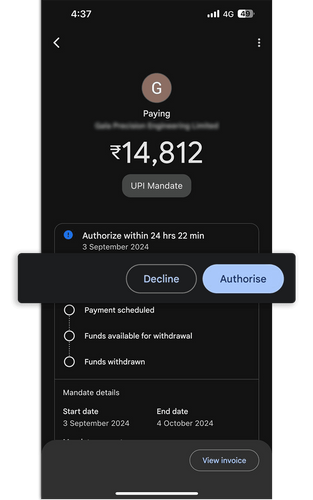
Review the details and authorize the mandate by tapping on the Authorize button.
5. Complete Mandate Setup
Once authorized after inputting your UPI pin, your IPO mandate will be processed, and the required amount will be blocked in your account for the IPO application.
Important Points to Keep in Mind
-
Possible Delays in Receiving the Mandate In some cases, there may be a slight delay in receiving the IPO mandate approval request on Gpay or PhonePe. This could take up to 24 hours, so we suggest remaining patient during this time.
-
What to Do if You Don’t Receive the Mandate If the mandate request isn’t received within the expected timeframe, you have the option to cancel the IPO application and reapply. Reapplying will trigger a new mandate request.
-
What Happens to Blocked Amount if IPO Not Allotted If the IPO is not allotted to you, the blocked amount will be released back into your account within 24-48 hours.
By following these simple steps, you can ensure that your IPO application through Kotak Neo is completed smoothly using Gpay. While delays are rare, it’s good to be prepared by knowing the process and options available to you in case you face any issues. If you have any questions or need further assistance, feel free to reach out to our customer service team for support.
Happy investing with Kotak Neo!