
How can I check the interest that is being charged for my Pay Later(MTF) position?
Within Neo, there are a few places you can check your MTF interest rate from.
First, you can see the interest rate from the MTF Research section. To go over here, click on Home > Stocks > Scroll down till you reach the Kotak Research section. Here, you will see MTF ideas. Click on ‘View more’ and you can see your MTF interest rate at the top.
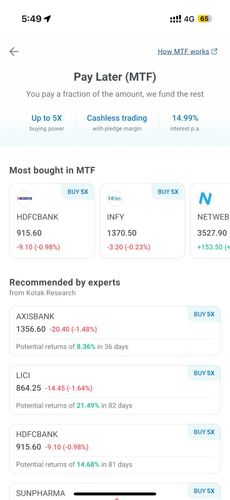
As you can see, here the MTF interest rate for the user is 14.99%.
You can also check the interest rate charged to you on the order form page on NEO.
- Select the stock that you wish to purchase and click on BUY
- Enter the quantity you wish to purchase, select the order type as limit or market and select your product type as “Pay later”
- You can now see the interest that will be charged per day to you on the stock from t+1 day onwards in blue

Lastly, you can always check the interest amount in your interest statement using the following steps:
- Go to profile section from the top right corner of your home screen by clicking on your initials
- Click on “View all reports”
- Under ‘Regulatory reports’, click on “Interest statement”
- You can download the DPC (DP Charges) statement and see your MTF interest in it
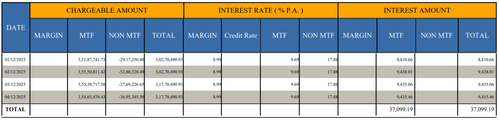
As you can see, from the above image, the user has MTF interest rate of 14.99% p.a
You can also call the customer service at 1800-209-9191, from Mon-Sat between 8.30 am-6.00 pm to know your MTF interest rate.