I manually squared off my positions from Kotak Neo, but later the Strategy Bot executed exit orders. Why did this happen?
The Strategy Bot can only track and manage positions that are controlled through the Strategy Bot itself. If positions are manually squared off from the main Kotak Neo Positions page, the Strategy Bot is not aware of that action.
As a result, if the strategy remains active within Strategy Bot, it will continue monitoring its configured conditions such as:
- Stop Loss (SL)
- Take Profit (TP)
- Trailing Stop Loss (TSL)
- Time-based Exit
- Leg level - TP & SL
- Global Exit
When any of these conditions are met, the Strategy Bot will attempt to execute its exit orders as per the strategy configuration.
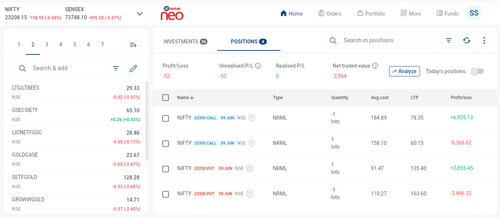
Kotak Neo Positions Page:
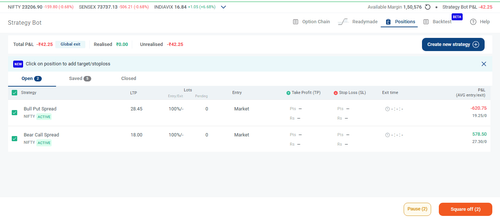
Strategy Bot:
Why can this create unintended positions?
When you manually square off a position from Neo, your actual market position may already be closed. However, if the Strategy Bot later triggers an exit, it will still place the corresponding exit orders because it believes the original strategy position is active. In such cases, the exit order may effectively behave like a fresh order and can create a new position.
Example
Suppose you entered a strategy that involved:
- Buy 1 NIFTY 24000 CE
You manually sold this option from the Neo Positions page and successfully closed the position.
Later, the Strategy Bot's Stop Loss or Target condition gets triggered. Since the strategy is still active within the bot, it places its exit order:
- Sell 1 NIFTY 24000 CE
Because your original position was already closed, this additional sell order may result in an unintended short position being created.
What should I do if this happens?
1. Check your Positions immediately
Navigate to the Positions section in Kotak Neo and verify whether any unintended open positions have been created. If you find any such positions, square them off immediately to avoid further market exposure.
2. Stop the active strategy
Open the Strategy Bot dashboard and locate the strategy.
- Pause the strategy, or
- Delete the strategy
This prevents the bot from continuing to monitor the market and placing any further automated orders.
How can I avoid this in the future?
If a strategy is being managed by Strategy Bot, it is recommended to manage entries and exits through the Strategy Bot itself.
If you choose to manually square off positions from the Neo Positions page, ensure that you also Pause or Delete the corresponding strategy in Strategy Bot. This keeps both systems in sync and prevents unintended orders from being placed later.
Important: Before manually squaring off positions, always pause or delete the corresponding strategy in Strategy Bot to avoid any automated exits being triggered subsequently.