Introducing Underlying-Based Entry & Exit on Strategy Bot
Trading strategies are often built around key market levels rather than option prices. Traders commonly think:
- "Enter this strategy if NIFTY crosses 24,500."
- "Exit if NIFTY falls below 23,500."
- "Book profits if the underlying index or stock price reaches a target level."
With the latest enhancement to Strategy Bot, you can now automate your strategy execution using the Underlying Spot or Future Price of the index or stock, eliminating the need to constantly monitor the market.
What is Underlying-Based Entry & Exit?
Underlying-Based Entry & Exit allows you to start or exit an options strategy based on the movement of the underlying’s (index or stock) Spot Price or Future Price.
Instead of triggering execution based on:
- Combined Strategy LTP
- Premium value (price)
- Time-based conditions
You can now also trigger actions when the underlying index or stock reaches a predefined price level.
Supported Underlyings:
- NIFTY
- SENSEX
- BANKNIFTY
- BANKEX
- Other supported indices and stocks (companies) available on Strategy Bot
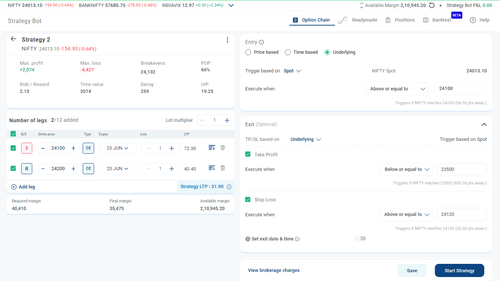
How Does Underlying-Based Entry Work?
When creating a strategy:
- Navigate to the Execution tab.
- Under Entry, select Underlying.
- Select Trigger based on Spot or Future
- Select when to execute:
- Above or equal to
- Below or equal to
- Above or equal to
- Enter your desired Price level.
- Start the strategy.
Example 1: Breakout Entry
Current NIFTY Spot: 24,013
Condition:
- Enter when NIFTY Spot is Above or Equal to 24,500
- The strategy remains armed and automatically executes once NIFTY Spot reaches 24,500.
Example 2: Breakdown Entry
Current BANKNIFTY Spot: 57,600
Condition:
- Enter when BANKNIFTY Spot is Below or Equal to 57,300
- The strategy executes automatically once the breakdown level is reached.
How Does Underlying-Based Exit Work?
Under the Exit section, you can set TP/SL exits based on the Underlying.
Take Profit (TP)
Exit the strategy when the underlying reaches a favourable level.
Stop Loss (SL)
Exit the strategy when the underlying reaches an unfavourable level.
Multiple Exit Conditions Supported
Strategy Bot supports multiple exit conditions, only in the case of Underlying based entry.
You can simultaneously configure:
- Underlying-based Take Profit
- Underlying-based Stop Loss
- Point or Rupees (₹) based TP/SL
- Exit Date & Time
Exit Logic
- The first exit condition that gets triggered will exit the entire strategy.
Example
Entry:
- Enter when NIFTY crosses 24,500
Exit Conditions:
Take Profit:
- Exit when NIFTY reaches 24,800
Stop Loss:
- Exit when NIFTY falls below 24,350
Exit Time:
- 3:19 PM
Points/Rupees:
- 10 | ₹ 650
Whichever occurs first will exit/square-off the strategy.
How Trigger Detection Works
Strategy Bot continuously monitors the underlying Spot or Future Price.
When the configured condition is met:
- Strategy Bot initiates strategy execution or exit.
- Orders are placed according to the configured strategy.
Trigger Validation & Protection
To ensure reliable execution, Strategy Bot applies validation checks.
1. Trigger Condition Already Met
If the entered trigger value has already been crossed, the strategy cannot be saved or started.
Example
Current NIFTY Spot:
- 24,013
Condition:
- Above or Equal to 24,000
Since NIFTY is already above 24,000, the trigger has already been satisfied.
Error:
- Trigger condition already met. Please enter a value above current spot.
2. Spot Price Range Validation
Underlying trigger levels must remain within ±10% of the current Spot Price in case of Indices and ±20% in case of Stocks (companies)
Example
Current NIFTY Spot:
- 24,000
Allowed Range:
- 21,600 to 26,400
If a value outside this range is entered, Strategy Bot will display an error and prevent strategy creation.
Examples for Using Underlying-Based Triggers
For Breakout Strategies
Examples:
  - Long Call </br>
  - Bull Call Spread </br>
  - Bull Put Spread </br>
Use:
Above or Equal to:
- Entry near important resistance levels.
For Breakdown Strategies
Examples:
  - Long Put </br>
  - Bear Put Spread </br>
  - Bear Call Spread </br>
Use:
Below or Equal to:
- Entry near important support levels.
For Range-Bound Strategies
Examples:
  - Iron Condor </br>
  - Short Strangle </br>
  - Short Iron Butterfly </br>
Consider using:
  - Underlying-based Entry & Exit </br>
  - Time-based Exit </br>
to manage risk effectively.
Benefits of Underlying-Based Entry & Exit
Trade Based on Market Structure
Execute strategies around support, resistance, breakout and breakdown levels.
Reduce Manual Monitoring
Let Strategy Bot monitor the market for you.
Avoid Emotional Decision Making
Automate entries and exits using predefined rules.
Align Strategy Execution with Market View
Create strategies that activate only when your market thesis is validated.
Frequently Asked Questions (FAQs)
It allows you to automatically start a strategy when the underlying index or stock reaches a specified Spot or Future Price level.
It allows you to automatically exit a strategy when the underlying index or stock reaches a specified Spot or Future Price level.
Strategy Bot uses the underlying index's Spot Price or Future Price for evaluating trigger conditions, based on what you have selected while creating the strategy.
Yes. While creating an Underlying Based entry.
You can configure both Underlying Based TP and SL simultaneously. The first condition to trigger will exit the strategy.
Yes.
You can use:
- Underlying-based TP
- Underlying-based SL
- Exit Date & Time
together.
The first condition that is met will trigger the exit.
Yes.
Multiple exit conditions can coexist.
The first exit condition that gets triggered will close the strategy.
No.
Take Profit and Stop Loss should be configured in opposite directions. Strategy Bot validates and prevents conflicting configurations.
The Spot Price has already crossed the level you entered.
Example:
- Current Spot: 24,000
Condition:
- Above or Equal to 24,050
Since the condition is already satisfied, the strategy cannot be started.
If the underlying Spot Price crosses your configured trigger level, Strategy Bot will attempt to execute the strategy based on the first available market price.
Actual execution price may differ from the trigger level due to market movement and liquidity.
No.
The trigger determines when execution begins.
Order execution depends on:
-
Market conditions
-
Liquidity
-
Bid-ask spreads
-
Exchange response
This validation helps prevent unrealistic trigger levels and ensures reliable monitoring and execution.
If an Entry or Exit condition remains unmet, the strategy will get paused at the end of the day.
The next day, you will have to review your exit conditions as per the current market conditions, and start the strategy.
Yes, any modification capability will depend on the strategy's state and available adjustment features. Refer to the strategy adjustment options available within Strategy Bot.
Yes. It can be used with any supported Strategy Bot strategy where execution automation is available.
Underlying-Based Entry & Exit brings Strategy Bot one step closer to rule-based options trading by allowing traders to automate execution around the levels that matter most.
Define your market view, set your Price conditions, and let Strategy Bot handle the monitoring and execution for you. 🚀
Important Clarification
Strategy Entry and SL/TP Exit is a risk-management trigger, not a guaranteed exact entry and exit price.
It helps automate entry and exits when your threshold is reached, but the final booked P&L depends on:
- Bid-Ask spreads + the MPP configuration
- Speed of price movement
- Multi-leg execution timing
- Market liquidity
Kotak Neo, at all times, bears no liability towards you for any reason whatsoever with respect to using the Strategy Bot feature; including but not limited to, non-execution of any order using the Strategy Bot feature / either leg of the order, any opportunity loss for non-execution of such orders/trades, any cancellation or non-placement of any orders, and any such other claims which may arise from you with respect to using the Strategy Bot feature.
Still have questions?
Can I trade in Commodities on Strategy Bot?
I manually squared off my positions from Kotak Neo, but later the Strategy Bot executed exit orders. Why did this happen?
I had set up a desired Stoploss (SL) and Take Profit (TP) points/values — why did the system not properly trigger the Strategy SL & TP?
Does Global Exit still apply after a leg adjustment?