How to update the purchase price for off-market holdings
If you received shares via off-market transfer, gift, or inheritance, update the purchase price on Kotak Neo to ensure your P&L on future sales is accurate.
FOR OPEN (UNSOLD) HOLDINGS ONLY
Price updates are currently available only for holdings you still hold. If you have already sold off-market shares, this feature is not yet available — we will notify you when it is.
Before you begin
Transfer deed or broker note
You'll need the purchase price and date from the original off-market transfer document.
Kotak Neo app or browser
The Price Update page is on service.kotakneo.com — accessible from the Portfolio tab.
Exact quantity transferred
The quantity you enter must match what was transferred in the off-market transaction.
Transfer date
The date the shares were credited to your demat account via the off-market transfer.
Step-by-step instructions
STEP 1 Open Kotak Neo and go to Portfolio
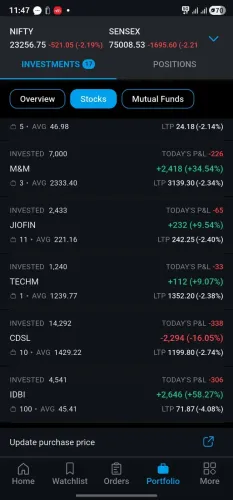
Log in to Kotak Neo. Tap Portfolio in the bottom navigation bar. Make sure you are on the Investments tab (not Positions), then select Stocks.
Tip: Scroll to the very bottom of your Holdings list. You will see an "Update purchase price" link with an external icon — tap it.
STEP 2 You're taken to the Price Update page
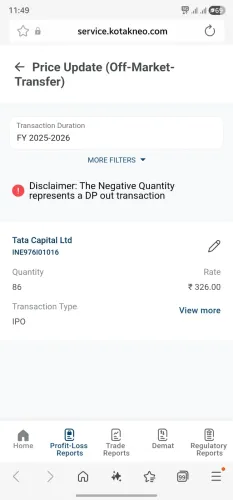
Tapping the link opens service.kotakneo.com — the Price Update (Off-Market Transfer) page. This lists all your off-market holdings for the selected financial year.
Tip: By default the page shows the current FY. Use More Filters to switch to a prior FY if your transfer happened in an earlier year.
Note: "Negative Quantity represents a DP out transaction" — this disclaimer is informational only. You can ignore it.
STEP 3 Tap the edit icon (pencil) next to the stock
Find the stock you want to update. Tap the pencil / edit icon on the right side of the stock row. This opens the Stock Details screen where you can enter the purchase details.
Tip: If you have multiple stocks to update, complete and submit each one at a time — update one, submit, then move to the next.
STEP 4 Fill in the stock details
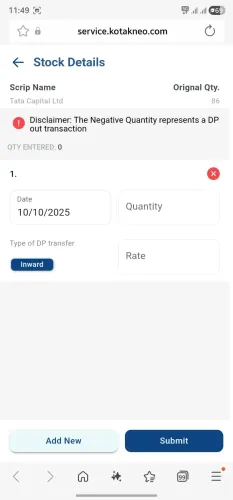
Enter the following: (a) Date — when shares were transferred into your demat account; (b) Quantity — must match the original quantity transferred; (c) Type of DP transfer — select Inward for shares received; (d) Rate — the price you actually paid per share.
Tip: Split purchases? Tap Add New to add another row for each lot. Total quantity across all rows must exactly match the original transferred quantity.
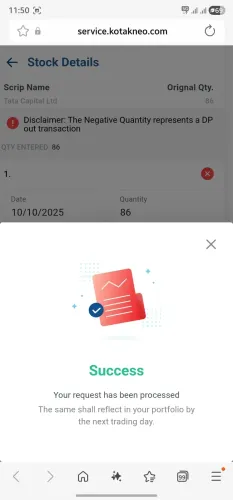
STEP 5 Tap Submit
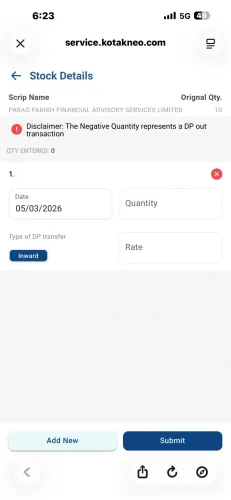
Once all details are filled in, tap Submit. If everything is correct you will see a Success screen. Your request has been processed and will reflect by the next trading day.
Tip: The updated purchase price will appear in your portfolio by the next trading day. Your holdings and unrealised P&L will update automatically.
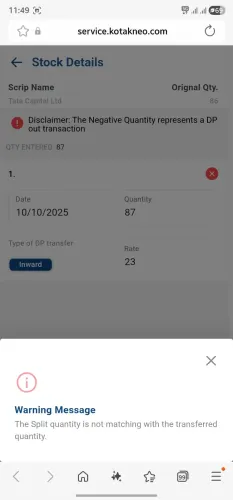
Common issue — warning message
"The split quantity is not matching with the transferred quantity" This appears when the total quantity entered across all rows does not match the Original Qty shown at the top of the screen. To fix:
- Check the Original Qty at the top — this is the total that must be matched exactly.
- Add up quantities across all your rows — they must sum to the original quantity.
- Edit the quantity in the relevant row(s) to correct the total, then tap Submit again.
Frequently asked questions
You can update the purchase price for open (unsold) holdings acquired through an off-market transfer — such as a gift, inheritance, or inter-depository transfer. This feature is not yet available for holdings that have already been sold.
Use the More Filters option on the Price Update page to change the Transaction Duration to the relevant FY. The filter defaults to the current FY, so switch it manually if the transfer happened earlier.
Refer to your off-market transfer deed, gift deed, or original purchase invoice. If shares were inherited, you may use the Fair Market Value (FMV) as of 31st January 2018 for pre-2018 acquisitions. Consult a tax advisor if unsure.
Yes — revisit the Price Update page and edit the details again if you made an error. The most recently submitted values will be used.
Your portfolio and unrealised P&L will reflect the updated purchase price by the next trading day after you submit.
Tap Portfolio → select Investments tab → tap Stocks → scroll to the very bottom of the list. The link appears below all your holdings rows.
No — price updates currently apply to open holdings only. Updates for already-sold holdings are not yet supported.