Transferring Within NSDL (NSDL → NSDL)
- Updated: 22 May 2026, 5:16 PM IST
- | 4 min read
- 4,361
 Add Preferred News Source
When This Applies:
Your old broker uses NSDL AND Kotak (which uses NSDL) – Both accounts are in the same depository.
Online Transfer via NSDL Speed-e (Fastest & Easiest) ⭐
NSDL Speed-e is an online system for transferring shares between NSDL accounts. It’s fast, secure, paperless, and completely digital.
Step 1: Register for NSDL Speed-e (One-Time Setup)
Visit NSDL e-Services:
-
Go to: https://eservices.nsdl.com
-
Look for: “Speed-e Registration” or “New User Registration”
-
Select: “Password User'' (not Smart Card)
-
Click: “Register”
Fill in Your Details:
-
Your DP ID: (Your old broker’s DP ID, e.g., CDSL participant code if applicable, or NSDL if applicable)
-
Your Client ID: 8-digit number
-
Email Address: Your registered email with old broker
-
Mobile Number: Your registered mobile with old broker
-
Create Password: Your chosen Speed-e password (remember this)
What Happens Next:
-
Download the filled registration form (PDF)
-
Send this form to: speede@nsdl.co.in from your registered email address
-
Your old broker’s DP will verify and approve within 1-2 working days
-
You’ll receive an email with your Speed-e login credentials
Save Your Speed-e Login Credentials:
-
User ID: (provided by NSDL)
-
Password: (your created password)
-
Keep these safe – you’ll use them to initiate transfers
Step 2: Log Into NSDL Speed-e
-
Go to: https://eservices.nsdl.com
-
Click: “Speed-e” or “Existing User Login”
-
Enter: Your User ID and Password
-
Complete OTP verification (sent to your registered mobile/email)
-
You should now see your demat account dashboard
Step 3: Add Kotak as a Beneficiary (One-Time)
Before you can transfer shares to Kotak, you must pre-authorize Kotak’s account as a trusted beneficiary:
In Speed-e Dashboard:
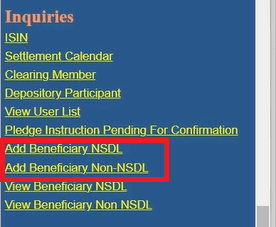
- Go to: Inquiries → Add Beneficiary (NSDL)
2.Enter the following details:
- DP ID (of target): IN300214 (Kotak’s NSDL DP ID)
- Client ID (of target): Your 8-digit Kotak demat number
- Your PAN: (Should auto-fill; must match your source account)
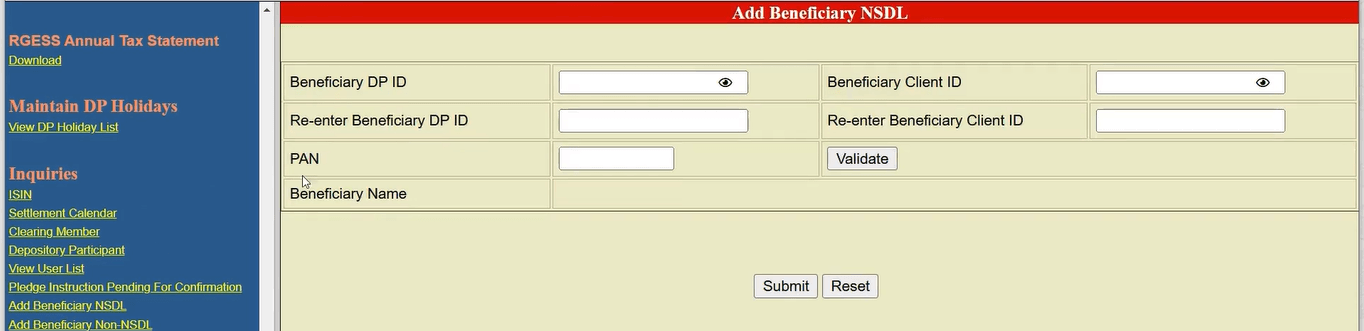
3.Click: Submit
4.Verify with OTP:
-
NSDL will send an OTP to your registered mobile/email
-
Enter the OTP to confirm
-
You should see a success message: “Beneficiary added successfully”
From now on, you can transfer to Kotak anytime without re-adding.
Step 4: Initiate the Share Transfer
In Speed-e Dashboard:
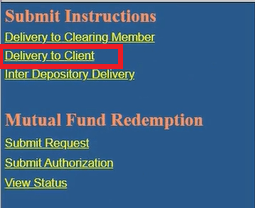
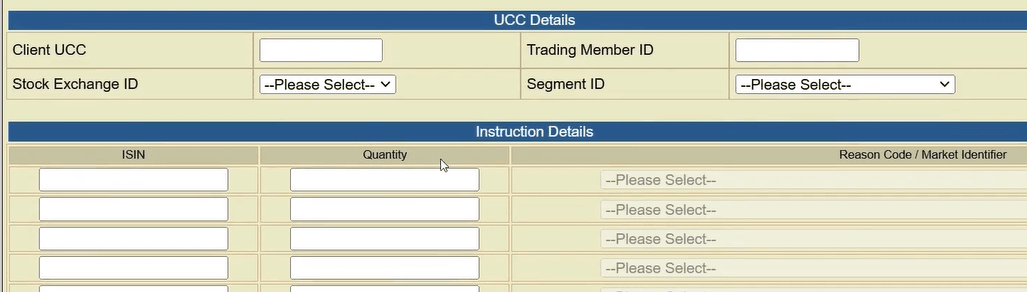
- Go to: Transactions → Submit Instruction → Delivery to Client
2.Fill in the transfer details:
Execution Date:
-
Today’s date (if submitted before 6 PM on a working day)
-
Or tomorrow/future date
Target Account Details:
-
Counter BO ID: Select your Kotak account from the dropdown (you added it as a beneficiary)
-
Or manually enter: Kotak’s DP ID (IN300214) + Your Client ID
Securities to Transfer:
-
ISIN: Select the stock code (dropdown will show your holdings)
-
Quantity: Number of shares to transfer
-
Repeat for each stock you want to transfer
Reason for Transfer:
-
Select: “Transfer to own account” or “Own Account Transfer”
-
Leave “Consideration Amount” as 0 – no money involved
3.Click: Submit
Step 5: Confirm and Receive Confirmation Number
Review Screen:
-
Double-check all details (stocks, quantities, target account)
-
Verify ISIN codes are correct
-
Ensure quantities don’t exceed your holdings
Confirm:
-
Click: Confirm
-
Enter OTP sent to your mobile/email
-
You should see: “Instruction submitted successfully”
-
Note down your Instruction Reference Number (for tracking)
Step 6: Track the Transfer Status
In Speed-e:
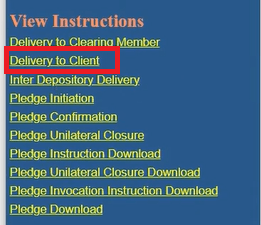
- Go to: View/Track Instruction → Delivery to Client
2.Enter your Instruction Reference Number
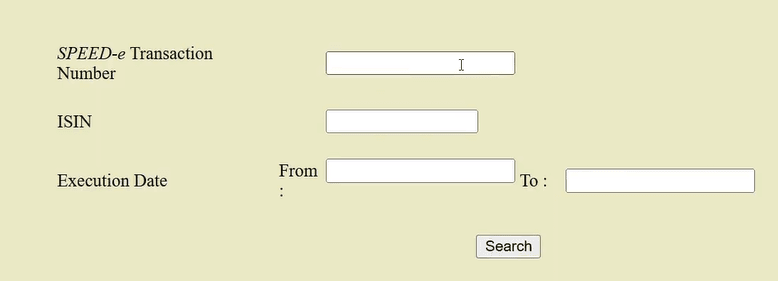
3.Check status:
-
Pending: Instruction received, awaiting processing
-
Executed: Transfer completed
-
Failed: Contact NSDL support
Expected Timeline:
-
Usually executes in 2-3 days
-
You’ll receive an SMS/email from NSDL when completed
Step 7: Verify in Your Kotak Account
Once transferred (check your SMS/email notification):
- Log in to Kotak Neo app/website
- Go to: Portfolio → Investments
- Verify the transferred shares appear
- Check the quantity matches what you transferred
✓Transfer Complete! The shares have moved from your old account to Kotak.
The content in this blog is intended purely for educational purposes. Any securities or mutual funds referenced are illustrative in nature and do not constitute a recommendation or endorsement by Kotak Neo. Investors are encouraged to assess their own financial situation and seek professional advice before making any investment decisions. For compliance T&C and disclaimers, Visit https://www.kotakneo.com/disclaimer/
0 people liked this article.

Kotak Neo (Kotak Neo) is India's venerable stockbroking company with a rich legacy. It offers comprehensive investment services across asset classes, prioritising a technology-first approach for a seamless experience. Trusted by 5 million+ customers, it guides you toward financial success with ease of investment and speed of trade.
Note: The opinions expressed in this blog are personal viewpoints and should not be construed as recommendations.